
Govern how long documents stay in your Intellistack Streamline repository


.jpg)
The Document Repository in Intellistack Streamline gives your teams one place to store, search, and act on agreements generated through your workflows. You can now go further: admins can set a document retention period at the organization level, and stored documents are automatically purged when that period ends.
For a legal ops team managing intake workflows, that means contracts stay in the repository long enough to review, export, or recover from a failed downstream upload - then delete on a predictable schedule without manual cleanup. Builders and admins see the scheduled deletion date on every stored document and can download or archive files before purge.
Your document repository, with a governed lifecycle
Whether you are generating simple documents from intake data or legal agreements outlining deal terms, the repository keeps agreements with version history and searchable metadata in one secure location. Retention settings add a governed lifecycle on top of that storage.
With configurable retention, you can:
- Set an org-wide retention period that every document-storing workflow inherits automatically
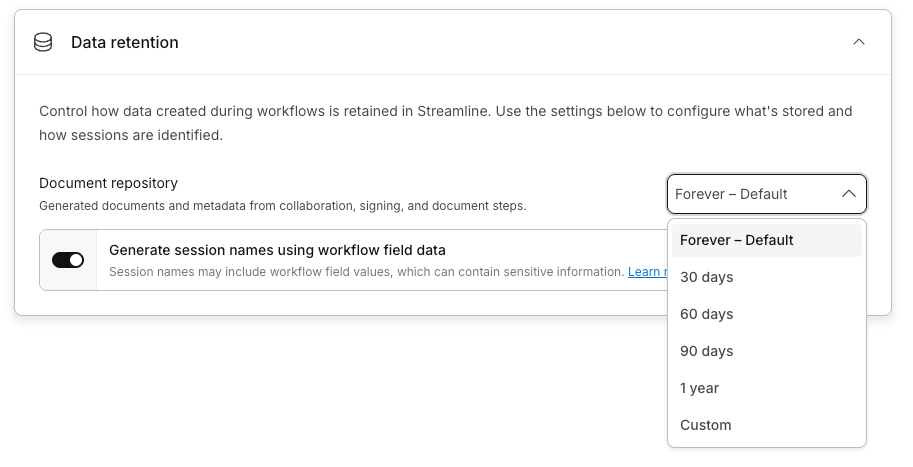
- Choose from preset periods (30, 60, or 90 days, or 1 year) or enter a Custom value (minimum 3 days)
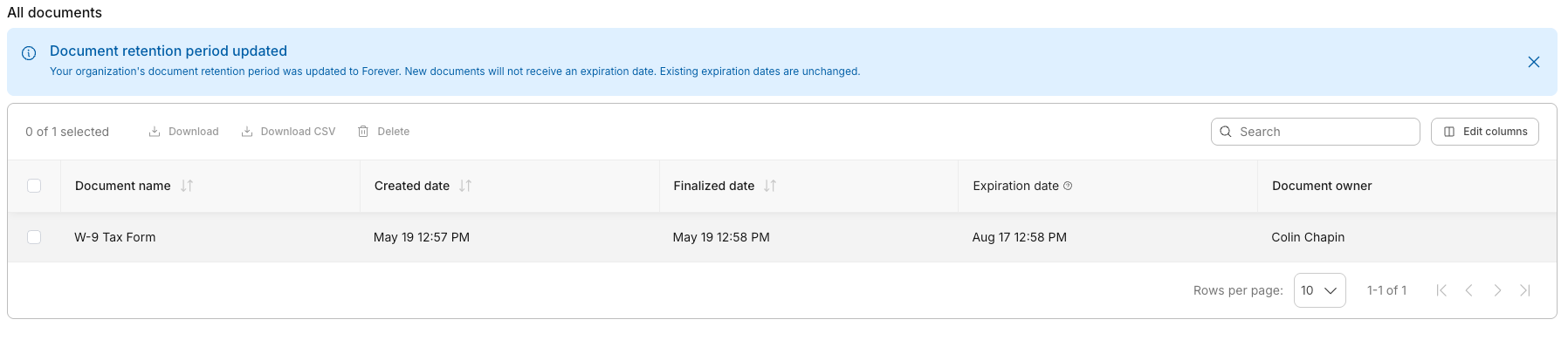
- View an Expiration date on each stored document in the repository
- Rely on automatic purge when the retention period ends - no builder action required per workflow
Admins configure retention in one place under their Org Security. Forever is the default - documents stay in the repository until someone deletes them or you change the setting. Select a preset or Custom period and documents purge automatically when that period ends after a workflow completes or fails. Select “Never” to stop storing documents from future workflows and remove all existing repository documents.
The retention clock starts when the workflow finishes
Expiration dates are set when a workflow reaches a terminal state - Completed or Failed - not when a document is uploaded. Documents in active workflows are not subject to retention purge. Each repository document stores one expiration date, and all versions of that document are deleted together when the date passes.
Purge runs on a schedule, not at the exact expiration timestamp. Under normal load, physical deletion occurs within approximately 24 hours of the expiration date.
The same expiration date is available through the repository document API for teams that need it in external compliance or archive workflows.
What happens when you change the period
When an admin changes the org retention period, existing documents are recalculated from each document's workflow completion date. Shortening the period removes overdue documents on the next purge run, not immediately. Lengthening the period extends expiration dates from the original workflow completion date. Admins receive in-app and email notifications when the retention setting changes.
Stay on top of active work with the workspace
The repository holds finalized documents with their full history. For agreements still in motion, the Workspace remains your real-time view into active collaboration and signature tasks - who is reviewing, what is outstanding, and where to jump in and act.
Retention applies to stored repository documents after a workflow completes or fails. Active sessions and in-progress collaboration are unaffected.
What this unlocks
Legal and procurement teams Set a retention period that matches your contract lifecycle policy. Find agreements by counterparty or metadata, track upcoming expirations in the repository, and know stored documents will purge on schedule once workflows finish.
Operations and IT leaders Give security and compliance reviewers a documented, enforceable document lifecycle instead of indefinite storage. Configure retention once at the org level. Every workflow inherits the same policy without builders managing deletion individually.
Teams with downstream integrations Use a short custom period when documents are extracted into an external system and no longer need to live in Streamline. Use a longer custom period as a failure-recovery buffer when exports to Salesforce or other systems can fail and need retry.
What to know before you start
- Org-level only. There is no per-workflow retention override in this release.
- Repository documents only. Session execution data, platform datasets, audit logs, and AI conversation history are governed by separate retention timelines.
- Forever is the default. Automatic purge applies when you select a preset or Custom period. Never stops storage and deletes existing repository documents.
- Purge is permanent. Deleted documents are not recoverable through the product.
- Deletion may trail the expiration date. After shortening retention or enabling a period for the first time, overdue documents are removed on the next purge run, not immediately.
Available now
Configurable document retention is available for organizations with document storage enabled. Admins configure the retention period in org settings. All documents generated through Intellistack Streamline workflows continue to flow into the Repository section of your account.
For setup details, see the document retention help article.