



Your form asks a Canadian customer for their "State." They hesitate. They don't have a state, they have a province. They either skip the field (breaking your workflow) or enter "N/A" (breaking your data).
Collecting addresses shouldn’t force you to choose between flexibility and clean data. Whether you’re building forms for customers in multiple countries or collecting addresses for a very specific region, the new Address field for the new Forms step within Intellistack Streamline gives you full control over how addresses look, validate, and flow through your systems.
Serve multiple countries without building multiple forms
Most teams don’t build forms for a single audience. They may have customers in the US, Canada, and the UK. Building three separate forms means three times the maintenance work. Using one generic form means everyone sees "State" even when that doesn't apply to them, leading to confusion and incomplete submissions.
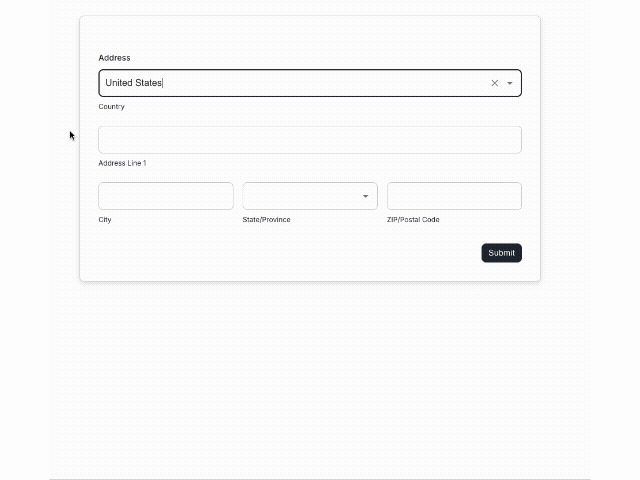
What you can do now: Build one address field that adapts to wherever your user is:
- Set your default country (e.g., United States)
- Let users change it if they're elsewhere
- The dropdown automatically shows users the right options based on country selection: US customers see states, Canadian customers see provinces, UK customers see counties
Bonus customization: To keep things clear across regions, you can customize sublabels like “State / Province / Region” once and use them everywhere. This gives you global clarity without duplicating forms.
Built for precision, not guesswork
Structured address inputs mean better data from the start.
Each part of the Address field is its own input and can be mapped independently. Street, city, state or province, postal code, and country all flow cleanly into your integrations without manual cleanup or parsing.
This also opens the door to smarter workflows. Because a state or province is its own field, it can be used for logic in the future. That means routing submissions, showing follow up questions, or triggering workflows based on location, all without relying on messy text inputs.
Control which states appear
Not every form needs all 50 US states.
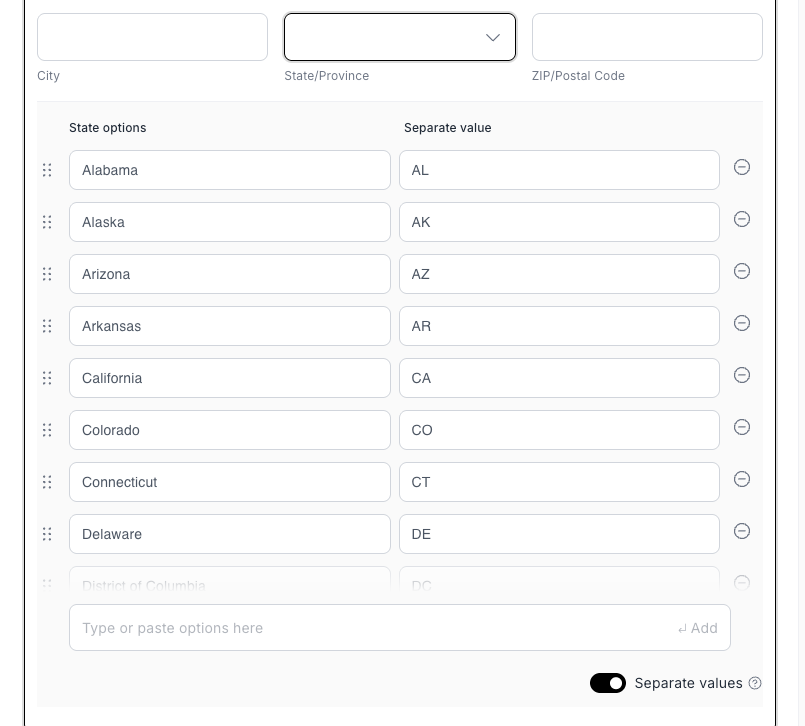
If your organization only operates in a few regions, you can edit the state dropdown for your default country and limit it to only the states you actually serve. This reduces user error, speeds up form completion, and keeps your data aligned with your business rules.
For teams that need even more accuracy, US address fields also support state names or state abbreviations. Whether your CRM expects “CA” or “California,” you can match your form to your system instead of fixing data later using separate values on the state/province dropdown.
Flexible by design
The Address field is fully configurable.
You can remove inputs you don’t need, rename sublabels, and design an address layout that matches your exact requirements. From simple location capture to fully validated mailing addresses, you build what makes sense for your audience.
Why it matters
Better address data means better decisions, smoother integrations, and fewer edge cases.
The new Address field was built to support real audiences, real systems, and real constraints. It adapts to where your users are, enforces the rules you care about, and sets you up for smarter logic and automation down the road.
Available now for all Intellistack Streamline customers.