



The latest product updates help you bring files into workflows from external systems and automatically organize files in Google Drive in Intellistack Streamline. We've also been focused on under the hood–performance enhancements, infrastructure upgrades, and reliability initiatives that lay the groundwork for upcoming features in the Streamline platform.
Reminder: subscribe to receive release notes as soon as they are published. Simply click on “Follow” in the new release notes section of the Formstack Help Center and Intellistack Streamline Help Center.
Automatically Organize Files in Google Drive
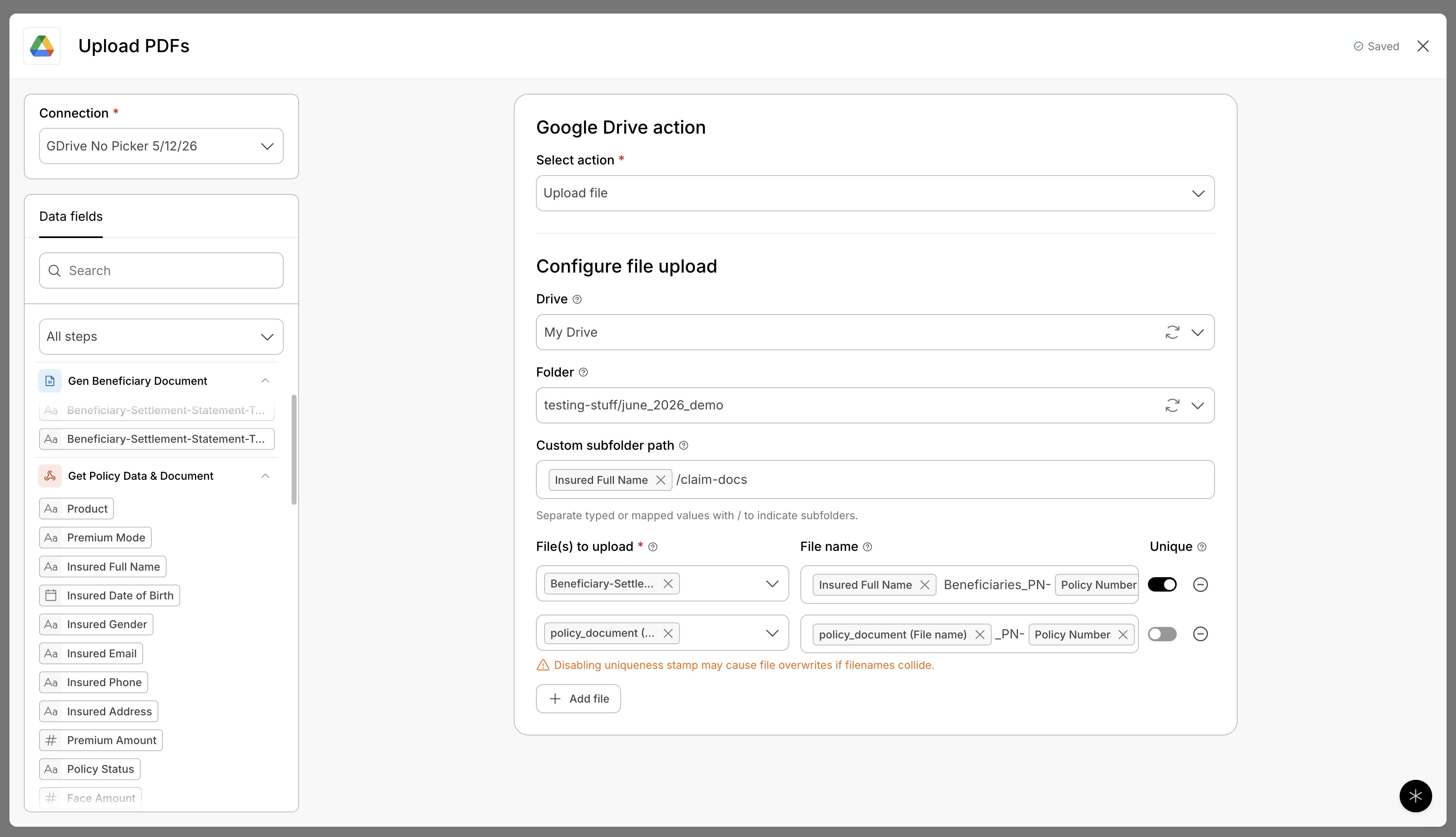
Our enhanced Google Drive integration for Intellistack Streamline can now create dynamic folder structures based on workflow data. Documents are automatically filed in the right location without requiring manual folder setup or maintenance.
Receive Files Through Incoming Webhooks
Intellistack Streamline now supports file attachments in Incoming Webhooks. External systems can send both data and files in a single request, making it easier to launch workflows that depend on documents, images, or other uploaded content.
Build More Connected Workflow Automations
Together, these updates make it easier to automate processes that start outside Intellistack Streamline and automatically file every workflow document into the right Google Drive folder. Files received through webhooks can move directly into forms, document generation, notifications, storage destinations, and other workflow steps.
May 2026 Release Notes
Continue exploring this month’s updates for Formstack products and Intellistack Streamline by reading the full release notes below. You can also view full release notes from previous months in the release notes section of the Formstack Help Center and Intellistack Streamline Help Center.
Formstack Forms
Defect Fixes
- Fixed an issue where multi-page forms would display incorrectly when navigating between pages, particularly when moving from page 2 to page 3 or using the 'previous' button to return to earlier pages.
- Fixed an issue where the automatic deletion feature ignored age settings and deleted form submissions too quickly while still editing form settings.
- Fixed an issue where users were unable to proceed past the first page of multi-page forms due to the Next button not working properly.
- Fixed an issue where form field changes were not saving properly, causing an 'Error: changes not saved' message to appear when editing fields.
- Fixed an issue where form callouts prevented users from advancing to the next step when using Firefox browser.
- Fixed an issue where forms were not fully accessible to users with screen readers and other assistive technologies due to missing labels and broken references.
- Fixed an issue where Formstack integrations were not working properly due to reCaptcha challenges interfering with system connections.
- Fixed an issue where different form field types displayed text in inconsistent font sizes across all form themes.
- Fixed an issue where the API was returning incorrect process time data for workflow form submissions, showing submission time plus API call time instead of the actual time it took for the workflow to complete.
- Fixed an issue where certain API requests could fail with server errors due to data processing problems.
- Fixed an issue where form fields incorrectly appeared to have validation errors, causing red borders to display when no actual errors were present, when using a custom theme.
- Fixed an issue where saved form data would not appear when resuming a password-protected workflow form, causing users to see a blank form instead of their previously entered information.
- Fixed an issue where dropdown columns in table fields were not displaying the correct label information in generated documents, even when configured to save labels or both labels and values.
- Fixed an issue where users created through custom SSO providers were missing their first and last names.
- Fixed an issue where confirmation emails were not being sent to users after their forms were approved.
- Fixed an issue where users weren't warned that confirmation emails cannot be sent after approval decisions on encrypted forms.
- Fixed an issue where links in integration failure notification emails were not working properly for Stripe integrations.
- Fixed an issue where form data encryption could get stuck in an incomplete state, potentially preventing access to submission data.
- Fixed an issue where users were unable to access their encrypted form submissions and received an error message when trying to view them.
- Fixed an issue where API v2025 experienced slower response times compared to previous versions when processing large numbers of form fields.
Formstack Documents
Defect Fixes
- Fixed an issue where PDF documents experienced formatting problems including incorrect text colors, misaligned text and fields, and data appearing editable when it should have been locked.
- Fixed an issue where password-protected documents were not being included when combining multiple documents into a single PDF through data routes.
- Fixed an issue where the Reports page was slow or unresponsive with large queries.
- Fixed an issue where documents were not being combined properly in data routes, causing them to be sent as separate PDFs instead of a single combined document.
- Fixed an issue where images stored in Box were not consistently appearing in documents when using document templates.
- Fixed an issue where AI document generation could fail due to how the system processed responses from the AI service.
- Fixed an issue where Salesforce notifications could fail to send when multiple requests were processed at the same time for the same account. Related to the Salesforce Connected Account changes.
Formstack Sign
Defect Fixes
- Fixed an issue where checkbox fields were not visible on the final signed document after completion of the signing process.
- Fixed an issue where some pages would not appear when uploading multiple large documents to Formstack Sign, requiring users to wait approximately 30 seconds after upload to see all pages properly.
- Fixed an issue where uploading multiple documents at once to Formstack Sign through Applied Epic would fail, while single document uploads worked normally.
- Fixed an issue where users encountered errors when using the signing feature in Workflows.
- Fixed an issue where file uploads were restricted by size limits that prevented some users from uploading their content.
- Fixed an issue where the Apply button was disabled and layout editing was restricted for certain templates, even for administrators with full permissions.
Formstack Workflows
Defect Fixes
- Fixed an issue where Workflows Pro customers were unable to access Workspace.
Formstack Forms for Salesforce
v4.147/v4.148 (released May 15, 2026)
- Added Authorize.Net as a payment option for Native Forms
Defect Fixes
- Addressed security concerns when processing certain user inputs through the template system.
- Fixed an issue where PDF attachments were not being included in emails due to a technical error during the email sending process.
- Fixed an issue where the form dashboard would crash when certain forms were missing version information.
- Fixed an issue where payment errors were not displayed correctly, causing users to see generic error messages instead of specific payment validation messages when their card was declined or had other payment issues.
- Fixed an issue where custom formulas using mathematical constants (like Math.PI, Math.E, or Number.EPSILON) would fail to calculate correctly and show invalid results or zeros.
Intellistack Streamline
New features:
- Signer Name Prefill - The signer name supplied at the start of a signing process is automatically prefilled in the signer’s Name field if present on the document.
- Replace Overlay Document - Upload an updated version of your overlay document to swap it out while keeping all previously placed fields in their current positions. Merge field positions should be reviewed in case an adjustment is required.
- Incoming Webhook File Support — The Inbound Webhook step accepts file attachments alongside JSON payloads, so external systems can deliver both structured data and file content into Streamline in a single call to initiate a workflow. Files received via webhook are stored in the Workflow Data Context and flow to any downstream step — Document Generation, Forms, Data Delivery, Outbound Webhooks — exactly like files from any other source. Workflows that depend on files originating outside Streamline can be triggered fully via webhook, bringing inbound file handling to parity with outbound.
- Receive file attachments alongside JSON payloads in an inbound webhook to start workflows that need both data and files
- Support multiple files per webhook call across base64, multipart form data, and raw binary content types
- Store received files in the Workflow Data Context so they are usable by Document Generation, Forms, Sign, Notifications, and Data Delivery
- Surface file metadata (name, type, size) in the data context for downstream routing and processing decisions
- GDrive Dynamic Folders — Our Google Drive integration was enhanced to allow you to automatically create and organize folders based on your workflow data. Instead of selecting a single static folder, you can now build dynamic folder paths using source data and form fields - like "/Department/CustomerName" - ensuring your documents stay organized without manual folder creation.
- Build dynamic folder paths in Google Drive using static text and workflow data fields, like Clients/{customer_name}/{year}
- Create nested folder hierarchies automatically when files are uploaded so document structure scales with workflow volume
- Reuse existing folders when names match instead of generating duplicates, keeping Drive organized over time
Defect Fixes
Data Management
- Improved Data Search error message.
- Fixed an issue where date and time values in Logic rules could temporarily display as raw text instead of the normal date picker after refreshing the page.
- Fixed an issue where date fields in Search Data steps would display incorrectly when using certain date format preferences, showing duplicate day numbers instead of the proper weekday name format.
- Fixed an issue where Data Delivery datetime mappings could fail when the source value was date-only, causing writeout errors about invalid UTC timestamps.
- Fixed an issue where hard-coded DateTime values in Data Delivery could fail writeout when locale preferences were not enabled on the workflow.
- Fixed an issue where Data Delivery writeout could fail when updating both a datetime field and a string field in the same step.
- Fixed an issue where records updated through Data Delivery were not immediately findable in a following Search Data step when filtering by the updated number value.
- Fixed an issue where the file upload API would return an unclear server error instead of a helpful error message when invalid entity identifiers were provided.
- Fixed an issue where setting up integrations with services like Dropbox would fail or timeout when users had large numbers of files in their accounts.
Document Generation
- Fixed an issue where typing in the collaborator name and email fields would cause the cursor to lose focus after each keystroke, requiring users to click back into the field to continue typing.
- Fixed an issue where users could click document actions like Save, Submit, or Complete before their recent edits were fully saved, potentially causing those edits to be lost.
- Fixed an issue where the name input field in the collaboration builder could appear blank or empty.
- Fixed an issue where the sign step in workflows wouldn't accept data from previous workflow steps when set to sequential signing mode.
- Fixed an issue where the signing process could get stuck loading when document fields were configured incorrectly.
- Fixed an issue where the Document Builder would crash and become unusable when uploading certain Word documents and accessing the Logic tab.
- Fixed an issue where document processing could become slow during periods of high traffic, causing delays in document-related operations.
- Fixed an issue where form tasks would not appear in the 'Assigned to You' view for users with a large number of active assignments.
Forms
- Fixed an issue where dragging mapping chips over form fields sometimes highlighted fields that were not valid to drop the mapping chip.
- Fixed an issue where changes in the builder that failed to save would still appear saved.
- Fixed an issue where the system incorrectly generated error alerts when trying to assign tasks to users or groups that had been deleted.
- Fixed an issue where the builder Elements panel would sometimes become blank after deleting a selected page.
- Fixed an issue where users could become stuck in the builder when settings validation failed, preventing them from closing the builder.
- Fixed an issue where Description fields that are part of form logic were not showing the logic indicator badge to help users identify which fields have conditional behavior.
- Fixed an issue where forms assigned to you were not appearing in the 'Assigned to you' tab, even though they were visible in other parts of the workspace.
Omni AI
- Fixed an issue where refreshing the page after a conversation was completed would cause the chat to appear stuck in a loading state indefinitely.
- Fixed an issue where the Omni chat would appear blank instead of showing a loading message while workflows were being created, and users could navigate away during the process.
- Fixed an issue where deleting a chat that was currently open would cause error messages to appear when trying to access the chat panel.
Workflow
- Fixed an issue where starting new sessions could take 4-23 seconds to respond due to internal system delays.
- Fixed an issue where the projects page was loading very slowly due to a database performance problem.
- Fixed an issue where users could encounter an error when trying to start a session immediately after creating a workflow.
- Fixed an issue where large workflow projects could not be saved due to size restrictions, causing 'Payload Too Large' errors.
- Fixed an issue where checking workflow session status could take up to 15+ seconds due to excessive retry attempts, causing slow response times when viewing session information.
- Fixed an issue where workflow step names could be saved with incorrect auto-generated numbers when renaming steps in the builder.
- Fixed an issue where the system was suggesting workflows that included unauthorized step types beyond the standard data capture, document, signature, and notification steps.
- Fixed an issue where project creation workflows could fail due to internal system communication problems during permission setup.
- Fixed an issue where file uploads would fail when using workflows embedded on external websites.
- Fixed an issue where workflows with similarly named steps (like 'Variable or Fixed' and 'Variable or Fixed 4') would fail to save with an error about steps not being properly linked.
Platform
- Fixed an issue where invitation links failed to generate for users in SSO-enabled organizations.