


These latest product updates focus on helping you automate more complex processes in Intellistack Streamline. Whether you're working with related records like line items, contacts, or beneficiaries, creating dynamic and complex documents, or getting new users productive faster, these latest updates help you build powerful workflows with less effort.
Reminder: subscribe to receive release notes as soon as they are published. Simply click on “Follow” in the new release notes section of the Formstack Help Center and Intellistack Streamline Help Center.
Repeating records across your entire workflow
Real business data doesn't exist as a single record. Orders include products, invoices have line items, and customers have contacts. Repeating Records in Intellistack Streamline keeps related data together throughout your workflow, making it easy to review information in forms, generate dynamic documents, and write complete data sets back to your connected systems without rebuilding relationships.
New user invitations and workflow recommendations
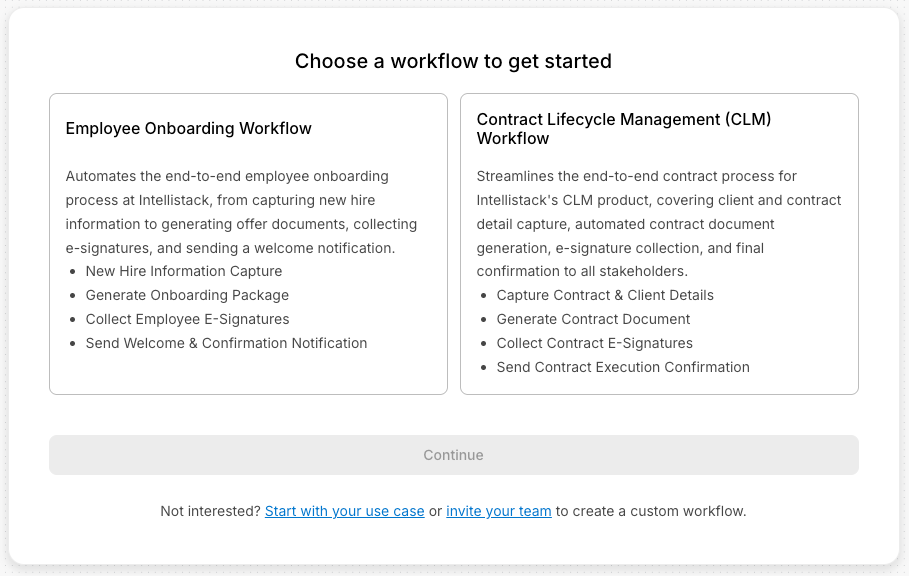
Invite new users to Intellistack Streamline with the right role, permissions, landing page, and welcome message before they even sign in. Personalized workflow recommendations help new users start in the right place and get productive faster.
Smarter dynamic documents with Smarty scripting
Intellistack Streamline now supports Smarty scripting in documents, allowing you to add conditional logic, calculations, loops, and formatting directly within your templates. Build more sophisticated documents without adding extra workflow steps.
Complex logic handling in documents
Complex Document Logic in Intellistack Strealine lets you show or hide document content based on workflow data using flexible Any/All conditions and AND/OR logic. Instead of maintaining multiple templates, you can build one document that automatically adapts to every scenario.
Guided onboarding for new users
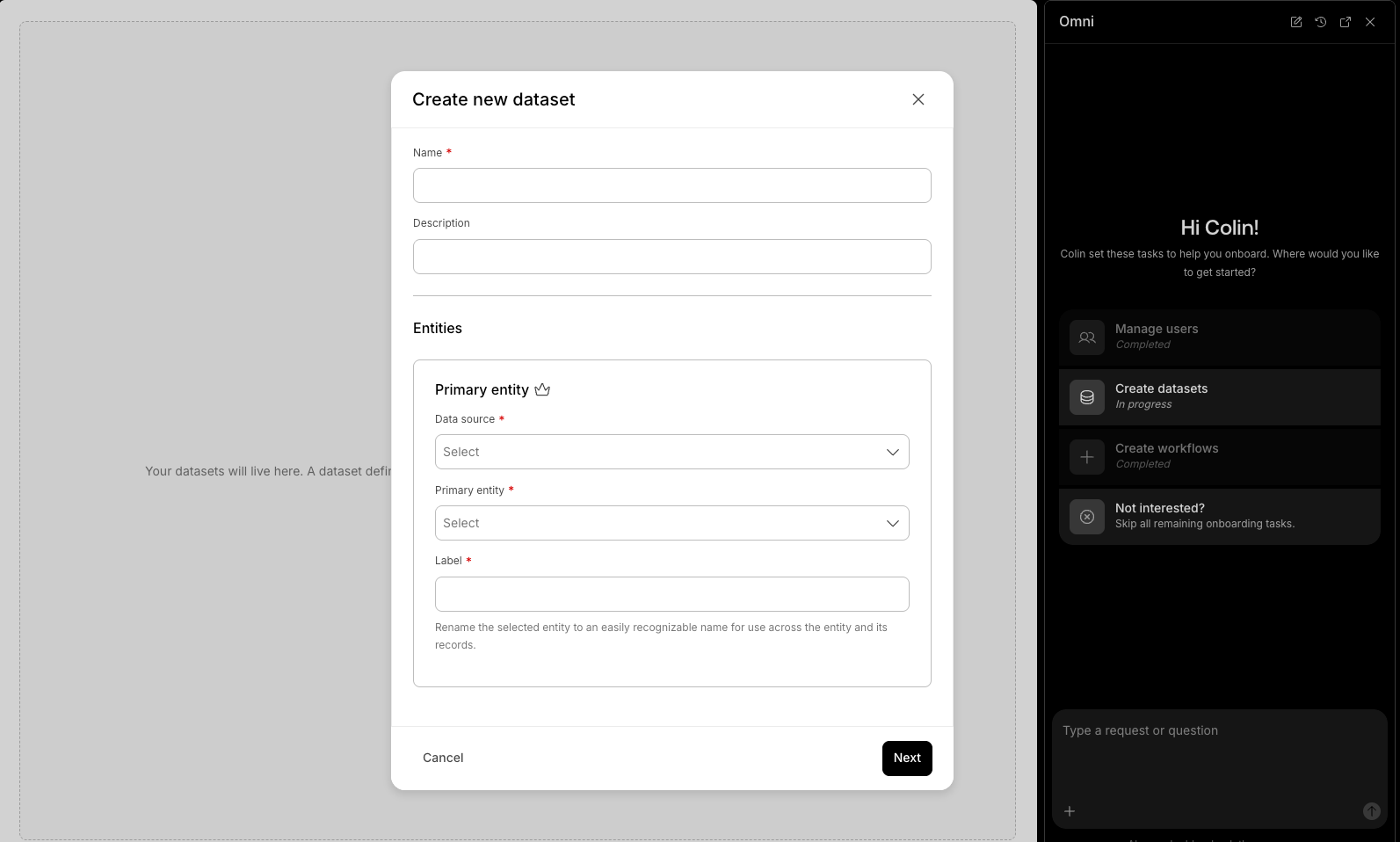
New Guided Onboarding, powered by Intellistack Streamline’s AI agent Omni, helps new users complete setup with role-specific task lists and conversational guidance. Users can resume unfinished tasks anytime and receive helpful suggestions based on where they're working.
June 2026 Release Notes
Continue exploring this month’s updates for Formstack products and Intellistack Streamline by reading the full release notes below. You can also view full release notes from previous months in the release notes section of the Formstack Help Center and Intellistack Streamline Help Center.
Formstack Forms
New Features
Formstack Forms WCAG 2.2 AA Compliance VPAT — Your forms are built to be usable by more people — including those who rely on screen readers or keyboard-only navigation. We’ve updated our official accessibility report (VPAT) to reflect WCAG 2.2 AA compliance, and you can download it from our Trust Center whenever you need it for a security review, RFP, or compliance checklist.
Defect Fixes
- Fixed an issue where, on a form with multiple file upload fields, taking photos with a mobile device camera would cause the last captured image to appear in all file upload fields instead of each field showing its own photo.
- Fixed an issue where custom theme styles were not appearing on Thank You pages after form submission, even when the theme's header and footer were displaying correctly.
- Fixed an issue where certain forms appeared unusually wide in the account view and did not scale properly to the screen width, and where attempting to copy those forms would time out and fail.
- Fixed an issue where a required field warning would appear on matrix questions as soon as a user clicked within the question, before they had a chance to complete their answer or move to the next page.
- Fixed an issue where form submissions from different locations were incorrectly showing the same location, even when submitted by different people in different places.
- Fixed an issue where page break indicators were not appearing in the form builder preview for sections that included a page break.
- Fixed an issue where the API documentation was missing certain files and contained outdated or incorrect references, which may have caused confusion when exploring or integrating with the API.
- Fixed an issue where certain form submit actions and integrations were not documented correctly through the Formstack API.
- Fixed an issue where two form submission endpoints returned data in different formats, requiring developers to write extra code to handle each one separately.
- Fixed an issue where creating a prefilled form link using the Forms API would fail with an error instead of generating the link successfully.
- Fixed an issue where notification emails in Forms Workflow were sent too early — triggering in the middle of a step rather than after the step was fully completed.
- Fixed an issue where adding a new approver to a form with a large number of submissions would fail and display an error instead of completing successfully.
- Fixed an issue where macron characters (e.g. ā, ē, ī) would appear as garbled or incorrect symbols when form submissions were exported as a CSV file.
- Fixed an issue where errors from the Google Drive integration could cause form submissions to be automatically approved unintentionally.
- Fixed an issue where address fields configured to use UK settings displayed incorrect validation messages based on US settings instead, such as showing 'zip code' instead of 'postcode'.
- Fixed an issue where field mapping changes made in the HubSpot integration were not being saved, causing them to revert after navigating away or refreshing the page.
- Fixed an issue where reordering sections or moving fields within a form would not save correctly, causing sections to revert to their original position after refreshing and fields to appear in the wrong sections.
- Fixed an issue where submitting a form could trigger duplicate API calls to Salesforce, potentially resulting in duplicate records being created.
- Fixed an issue where dragging a saved section into a form containing table fields could cause fields to appear in the wrong sections or disappear from their original sections.
Formstack Documents
Defect Fixes
- Fixed an issue where combined text formatting — such as underline and italics together — could break or display incorrectly when generating Word or PDF documents that use HTML content.
- Fixed an issue where PDF documents could have incorrect formatting and sizing after being generated from a template.
- Fixed an issue where line breaks added to PDF templates were not rendering correctly in the generated output documents.
- Fixed an issue where the link to delivery options on the Deliver tab in Formstack Documents was broken and did not direct users to the correct help article.
- Fixed an issue where help article links on the Formstack Documents home page were broken and did not navigate users to the correct support content.
- Fixed an issue where portrait-oriented images were being rotated and flipped when merging documents.
- Fixed an issue where files shared from Salesforce to Docs via a data route were not being delivered, even when the file links were successfully received.
- Fixed an issue where inserting a dynamic image into a PowerPoint file using the |insert_image modifier would place the image in the wrong position on the slide instead of where it was intended to appear.
- Fixed an issue where combining two documents with different page orientations in a Data Route would produce a corrupted output file.
- Fixed an issue where downloading a document as a PDF would return a file incorrectly labeled as a Word document (.docx), causing it to appear corrupted when opened in Word.
- Fixed an issue where emails sent with both the Delayed Delivery and Secure Document options enabled would arrive empty, without a link to download the document.
Formstack Sign
Defect Fixes
- Fixed an issue where the second signer in a multi-signer document could not see the information filled in by the first signer.
- Fixed an issue where documents sent via API could become stuck in processing and fail to complete successfully.
- Fixed an issue where the help link included in the Formstack Sign welcome email was broken and did not redirect users to the correct support website.
- Fixed an issue where the sent date was displayed as a numeric timestamp instead of a standard date and time format.
- Fixed an issue where some users were unable to search for their own documents and received an error message when attempting to do so.
Formstack Forms for Salesforce
v4.152/v4.153/v4.154 (released 2026-05-29)
- Fixed an issue where lookup requests could fail due to the wrong authentication credentials being used in the background.
- Fixed an issue where revoking an OAuth refresh token in Admin Settings would fail to generate the re-authorization link, leaving users unable to complete the re-authentication flow after revoking access.
- Fixed an issue where OAuth connection activity was not being saved during the authorization process, which could affect support and reporting on OAuth requests.
- Fixed an issue where reconnecting an integration account could fail silently, leaving the connection incomplete without notifying the user.
- Fixed an issue where completing the Welcome setup wizard could leave your account in a state where form integrations did not work correctly until an admin manually visited the Admin Settings page.
- Fixed an issue where Japanese text appeared as empty white squares instead of displaying correctly on PDF copies of form submissions.
- Fixed an issue where submitting or saving a form could display raw technical error messages to users instead of clear, friendly error text.
- Fixed an issue where publishing a form could cause its pages to be deleted, resulting in the published form appearing blank or incomplete.
- Fixed an issue where generating a prefill link for a form could silently produce a broken link — showing no error but directing users to a Formstack error page when clicked — if the form was missing a required prefill key.
- Fixed an issue where certain internal validation checks were failing, which could have prevented updates and improvements from being delivered reliably.
- Fixed an issue where PDFs generated from certain forms displayed a blank first page, with all content pushed to the second page or later.
- Fixed an issue where form submissions could fail for some users due to their IP address being incompatible with a field size limit, preventing the form from being submitted successfully.
- Fixed an issue where form submissions could be silently lost under certain high-load conditions, causing users to receive a submission confirmation even though their data was never actually saved.
v4.155 (released 2026-06-10)
- Fixed an issue where customers on an annual plan were incorrectly receiving submission limit notifications far earlier than expected, despite having significant remaining usage in their annual allowance.
- Fixed an issue where some accounts could be authenticated using an outdated login session instead of the most current one, which could cause login or connection failures.
v4.156 (released 2026-06-18)
- Fixed an issue where notification emails from form submissions were not being delivered to recipients.
- Fixed an issue where installing the app could fail for organizations with a large number of users, preventing permissions from being set up correctly after installation.
v4.157 (released 2026-06-18)
- Fixed an issue where deleting a form could fail to complete and return an error, leaving the form in an inconsistent state.
- Fixed an issue where generating a prefill link for a form could silently produce a broken link — showing no error but directing users to a Formstack error page when clicked — if the form was missing a required prefill key.
- Fixed an issue where generating a new prefill link could cause previously shared prefill links to stop working unexpectedly.
v4.157.2 (released 2026-06-22)
- Fixed an issue where logging in with Salesforce would fail and prevent access to the application.
Intellistack Streamline
New features:
- Form Step updates — we’ve made some small, but mighty updates to the Form step:
- Rename the Description field — You can now give Description fields custom names on the Forms step. When you're referencing Description fields inside a logic statement, renaming makes it easy to tell multiple fields apart at a glance.
- Logic tags on Description fields — Description fields now display logic tags in the builder like other field types, so you can quickly see which ones are referenced in your logic statements and keep your form organized.
- Repeating Records in Form Elements — Repeating sections in forms let builders display and collect sets of child records — like invoice line items or patient visit histories — within a single Form step. Each section binds to existing workflow data, supports field validation across every instance, and gives end users add/remove controls without restarting the session. Data entered or modified in repeating sections flows directly into downstream steps, completing the round-trip data lifecycle for parent-child workflows. Top capabilities:
- Render parent-child records as full form sections with multiple field types per record
- Add new child records on the form to capture every item.
- Pre-fill repeating sections from existing workflow data so assignees review and edit instead of re-entering
- Validate fields across every repeating instance before submit so incomplete child records are caught early
- Repeating Records in Data Search — The Search Data step retrieves parent records along with their related child records from connected data sources like Salesforce, SQL databases, and Airtable in a single activation. Builders choose which child relationships to include and can limit the number of records returned per relationship, keeping data volume in control. Workflows that require a complete parent-child data set activate all of it in one step, without chaining multiple searches or building custom API calls. Top capabilities:
- Search for a parent record and retrieve its related child records in a single step, without chaining searches or custom API calls
- Choose which child relationships to include so each workflow only pulls the data it needs
- Define parent-child relationships in dataset configuration, including nested relationships up to two levels deep
- Limit child records returned per relationship (e.g., "most recent 10 visits") to control activated data volume
- Repeating Records in Deliver Data — The Deliver Data step saves all changes to a related group of child records in a single action. It can create new records, update existing ones, and remove records that are no longer needed. It also automatically links each child record to the correct parent record, so there is no manual setup required. Builders can clearly see what worked and what failed, which makes it easier to troubleshoot problems and manage the full parent-child data process. Top capabilities:
- Write back a complete set of modified child records to the data source in a single operation
- Persist creates, updates, and deletes for child records in one step, so the full set of workflow changes is saved
- Maintain parent-child referential integrity automatically by assigning the correct parent ID to each child record
- See per-record success and failure detail so write-back issues can be resolved without re-running the workflow blind
- Repeating Records in Outbound Webhooks — Outbound webhooks transmit complete parent-child payloads, so builders can send a parent record alongside its full set of child collections to an external system in a single call. Builders choose which child relationships to include and control how nested hierarchies are structured, ensuring the receiving system gets a properly shaped JSON payload that matches what it expects. External integrations that depend on complete data sets — not just flat parent records — work end-to-end from Streamline without custom serialization logic. Top capabilities:
- Send a parent record with all its child records to an external system in a single outbound webhook payload
- Preserve the nested JSON structure authored in the webhook body so receiving systems get the hierarchy as designed
- Include multiple independent collections in one payload (e.g., line items and shipping addresses side by side)
- Render empty collections predictably as[]so receiving systems can parse results consistently every time
- Hide Default Email Footer — Brand editors now include a toggle to suppress the default Intellistack name and address block from workflow emails. When the footer is hidden, it is completely absent across all outgoing workflow email types - notification steps, task assignments, shares, and quick sends. Organizations that display their own company contact information or want workflow email to read as entirely their own communication can remove the platform footer with a single setting.
- Smarty Scripting in Dynamic Documents — Smarty scripting in dynamic document templates gives Builders direct access to conditional logic, inline math, and variable modifiers inside their document templates. Builders will be able to show or hide content, format field values in place, compute derived totals, and iterate over repeating records without adding separate Transform or Logic steps to the workflow. For teams migrating from Formstack Documents, existing Smarty-scripted templates can be brought into Streamline with minimal changes. With Smarty scripting you can:
- Write conditional blocks to show or hide paragraphs, table rows, and list items based on field values
- Apply variable modifiers inline to format output - uppercase, date formatting, number formatting, and more - without a separate Transform step
- Use looping to render repeating sections, like invoice line items, directly from a workflow collection
- Compute and display derived values using inline math expressions and variable assignments within the template
- Omni Guided Onboarding (previously known as Role-based first login - personalized onboarding for every user) — When a new user logs in to Streamline for the first time, they receive a guided orientation tailored to their role - Admin, Builder, Manager, or Operator. The experience surfaces their permissions, highlights the actions most relevant to their responsibilities, and walks them through completing their first task. Admins can provide additional context so each user's onboarding reflects their organization's specific setup.
- Who it's for: New Streamline users logging in for the first time, and Admins who want to ensure each team member understands their role and gets productive quickly.
- Requirements: Users must have an assigned role (Admin, Builder, Manager, or Operator) in Streamline.
- Top Capabilities:
- Show role-tailored guidance the moment a user lands on a Streamline page so they know what to do without searching docs or waiting for an SE
- Walk new users through key setup tasks conversationally with Omni - data integrations, datasets, webhooks, quick send, adding users - so they can finish independently
- Pick up where users left off when they return to Streamline mid-setup so progress and context are never lost
- Send re-engagement emails that take users directly back to the task they were working on if they haven't returned
- Send invitation reminders to users who haven't accepted yet so they can join without hunting for the original invite
- Expanded Status Support in Streamline for Salesforce — Workflow session and signing statuses stay current in Streamline for Salesforce as new ones are added. The managed package now reflects Delete and Cancel session states plus sign progress statuses like Awaiting turn, Sent, In-progress, and Completed. Users can track the full lifecycle of sessions and assignments from within Salesforce with the same accuracy as Streamline.
- Email Logo Position — Brands can place the logo in any of six positions - top left, top center, top right, bottom left, bottom center, or bottom right - across all workflow emails. The position is stored per brand and flows through the brand hierarchy the same way other brand settings do, so account-level defaults and workflow-level overrides behave consistently.
- Complex Document Logic — Builders control which fields appear on a generated document based on the data flowing through the workflow. In both the PDF (overlay) and DOCX (dynamic) document builders, builders create rules that show or hide fields when conditions are met — grouping conditions with Any/All logic and combining multiple groups with AND/OR. Each document adapts to the situation on its own, so recipients see only the fields relevant to them and teams maintain one intelligent template instead of many one-off versions. Top capabilities:
- Show or hide document fields based on workflow data, in both the PDF (overlay) and DOCX (dynamic) builders
- Group conditions with Any/All, and combine multiple condition groups with AND/OR for precise targeting
- Build conditions from field comparisons — Equals, Does not equal, Contains, Does not contain, Is empty, Is not empty
- Maintain a single adaptive document template instead of separate versions for each scenario
- Org-Wide Password Policy Controls — Admins can enforce security standards across the entire organization for any team members utilizing standard login credentials. These advanced policy settings build upon Streamline's existing security foundations, allowing for tailored account protection. Top capabilities:
- Establish a specific character minimum for passwords, with a baseline requirement of at least 12 characters
- Enforce mandatory password rotations by defining a set interval of weeks before a reset is required
- Restrict the reuse of identical credentials by determining the number of unique historical passwords the system must track
- Org-Wide Session Inactivity Settings — Admins can secure sensitive data by enabling automated session inactivity detection to terminate idle user connections. When active, Streamline tracks user engagement and programmatically signs out any session that remains dormant past the designated timeout period.
- Date, Time, Datetime, & Timezones — Set timezones and date/time formats per account or workflow so every step shows time the way you intend. Use static times when the moment should not shift by viewer, or timezone-aware times when it should follow local time. The same rules apply to across all your steps, reducing timezone mix-ups in critical workflows. Top capabilities:
- Set default timezones at the account, workflow, or field level, with each level overriding the one above
- Mark fields as static so a 4:00 PM Eastern surgery time always displays as 4:00 PM Eastern, regardless of viewer timezone
- Mark fields as timezone-aware so meeting times automatically convert to each viewer's local timezone
- Display a timezone label next to datetime values so end users always know which timezone they're seeing
Defect Fixes
Data Management
- Improved date and time mapping and compatibility for the Transform step.
- Fixed an issue where workflows would fail to continue when proceeding with zero search results on an optional search step.
- Fixed an issue where Omni could not save an Outbound Webhook step that was configured without authentication.
Document Generation
- Fixed an issue where custom text entered in 'Other' options for radio buttons and checkboxes on forms was not appearing on generated PDF documents.
- Fixed an issue where selecting 'Other' with custom text in radio button or checkbox fields would not appear in generated documents.
- Fixed an issue where the search functionality on the 'Assigned to you' page in Workspaces was not displaying correctly.
Forms
- Fixed an issue where changes to Dropdown, Radio button, or Checkbox option choices were sometimes not saved when clicking outside the form to deselect the field.
- Fixed an issue where renaming an Address or Name field from the form builder's left panel did not save.
- Fixed an issue where form fields could not be deleted after being resized to a smaller width.
Workflow
- Fixed an issue where workflows would gradually move toward the bottom right of the screen while being created.
Platform
- Fixed a UI hang during a password reset when using alternative MFA methods