


January product updates focused on helping teams work smarter with data inside Intellistack Streamline. Leading the way is the new AI-powered Transform Step, which makes it easier to shape, standardize, and reuse data across workflows. Alongside it, we’ve added more powerful form logic and calculations, faster document delivery, an integration with Excel Online, and outbound API calls (webhooks).
To view full release notes for Formstack products and Intellistack Streamline, scroll down past the highlights. You can also click here to view full release notes from January and by month from the past year.
NEW: You can now subscribe to our RSS feed for product update blogs using this link.
Transform and reuse data across workflows with AI-powered intelligence
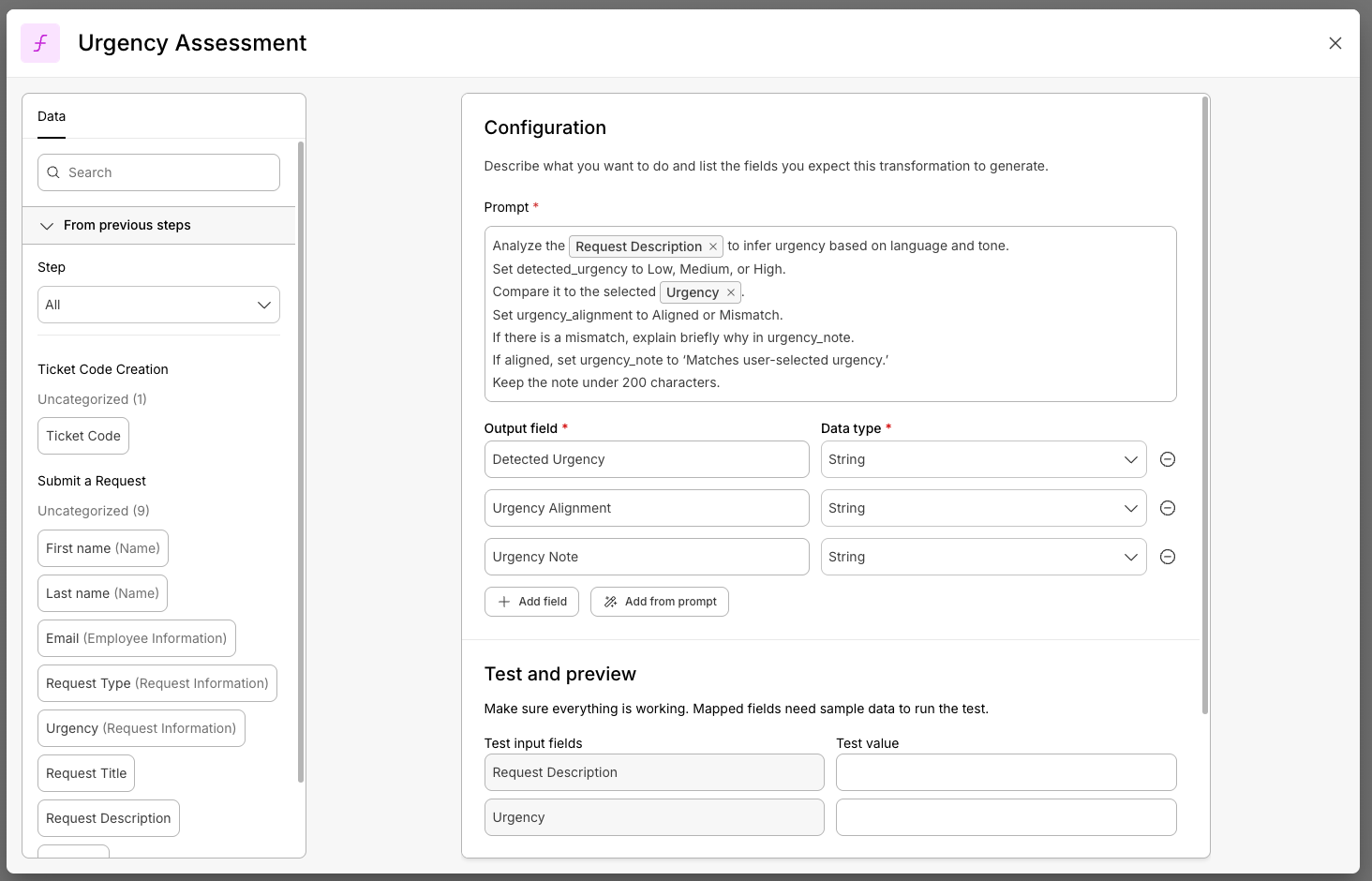
Bring AI-powered data intelligence to your workflows with the new Transform Step that lets you clean, reshape, and enrich data directly inside any Intellistack Streamline workflow. With this powerful data transformation, you can turn raw inputs into structured, system-ready outputs using plain language, and no code. The result is faster workflows, cleaner and more usable data, less manual work, and no external tools.
Build smarter, more dynamic forms with advanced logic and calculations
We introduced advanced logic and calculations to form building in Streamline, giving you the power to build smarter, more dynamic forms. Go beyond basic Show/Hide rules with If/Then conditions, nested logic, and a built-in calculations engine that handles everything from simple totals to complex scoring and qualification workflows. Build shorter, more responsive forms that adapt in real-time based on user input.
Collect cleaner data with new Form field types for date, time, and global address controls
New Form field enhancements in Streamline gives you more control over how information is collected. You can now choose whether a field captures a date, time, or both, making it easier to match real-world data needs. A new adaptive address field automatically adjusts to country-specific formats, helping international users enter accurate information without extra configuration.
Send documents in seconds and track everything in one place
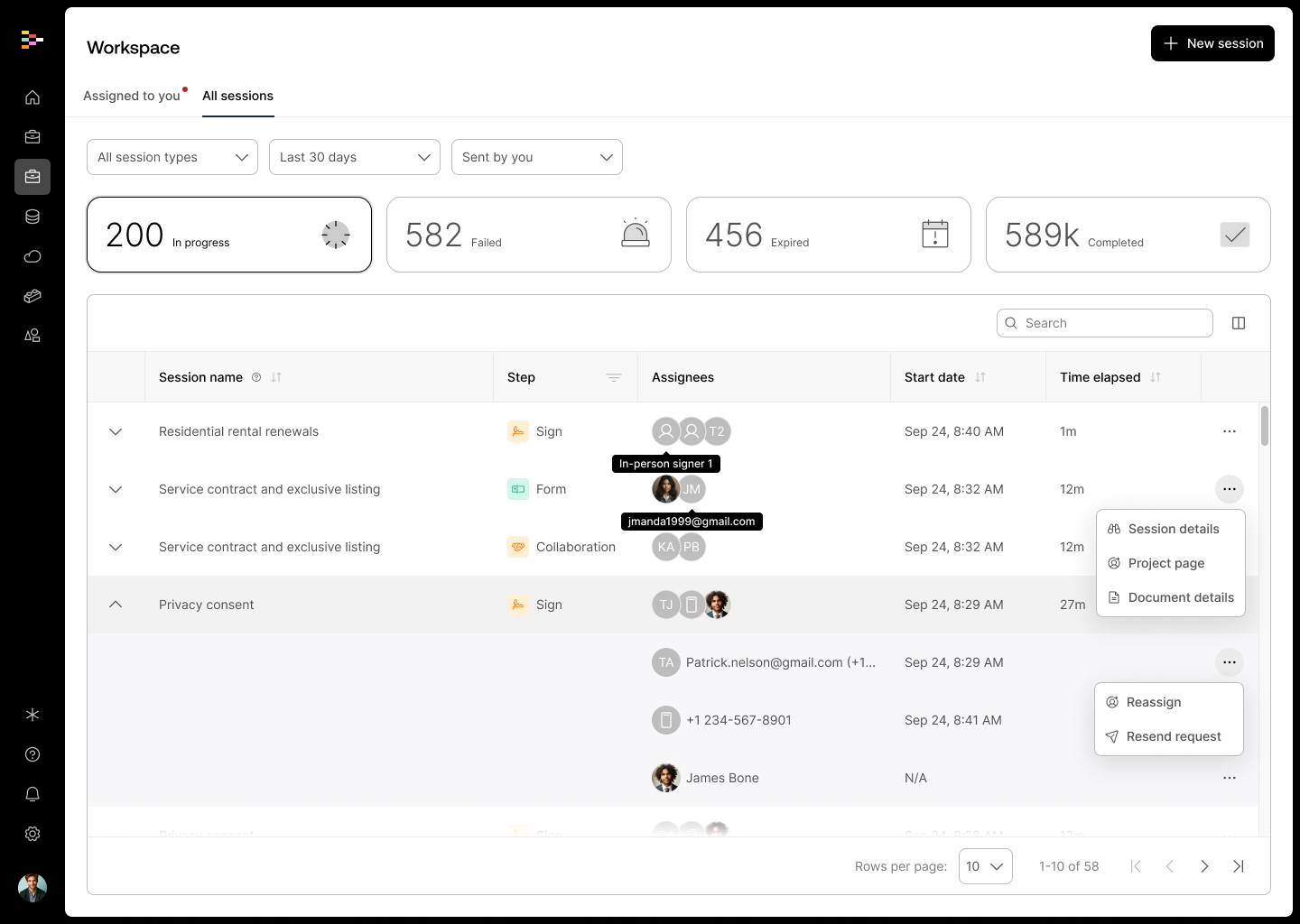
The new Quick Send feature in Streamline is the fastest way to share a document for collaboration or signature—no project setup required. Just upload your file, choose your recipients, and track progress in the Workspace, which houses all workflow session information. The Workspace is where you go to ensure workflow sessions are running smoothly and to view all tasks assigned to you.
Connect to more systems with outbound webhooks and Excel Online
Streamline continues to expand its integration capabilities with new outbound webhooks and an Excel Online integration. Outbound webhooks let you send workflow data to any external system via API, while Excel Online makes it easy to write data directly into spreadsheets for reporting or operational tracking.
Scale Salesforce-centric workflows with automatic triggers and status visibility
Teams running Salesforce-driven processes can now scale more easily with automatic workflow triggers and improved status visibility with Streamline for Salesforce. Workflows can start automatically based on Salesforce events, while real-time status updates make it easier to track progress, identify bottlenecks, and keep stakeholders informed throughout the contract or process lifecycle.
Introducing Branding in Intellistack Streamline: Make Every Interaction Branded
You can now manage how your brand is reflected in every workflow, whether it’s a simple form or a complex signature process. You can apply your company’s logo and primary color globally or customize branding by workflow to create a more trusted and professional user experience.
.gif)
January 2026 Release Notes
Continue exploring this month’s updates for Formstack products and Intellistack Streamline by reading the full release notes below. You can also click here to view full release notes from January and by month from the past year.
Formstack Forms
Defect fixes:
- Fixed not all smartlist data shown
- Fixed check Credit Card Field Translations
- Fixed update multiselect dropdown values
- Fixed colors applied in advanced editor
- Fixed charts break with Average function
- Fixed chart labels incorrectly showing HTML characters
- Fixed docs integration - add direct link to Doc
- Fixed internal Labels not respecting case
- Fixed Date/Time fields set to 2 columns format incorrectly on tablet
- Fixed show default value in form Builder
Formstack Documents
Defect fixes:
- Fixed documents stuck on the queue
- Fixed one or more Merge Fields are accessing object data on a non-object
- Fixed report tab timing out
- Fixed extra spaces in merged document (Rich Text Conversion Issue)
- Fixed Sign checkbox sizing doesn't match font
Formstack Sign
- Added Change Participant Email to Charlie API
Defect fixes:
- Added retry logic with exponential backoff for GlobalSign API rate limit errors (HTTP 429)
- Fixed mail gets removed when editing name
Formstack Workflows
- Assign or change assignment email from the dashboard—You can now set or update the assignment email directly from the dashboard. In the "Assigned To" column, a pencil icon appears next to the email (or where it would be if none is set). Clicking it opens a modal where you can add or change the email address for the assignment.
Formstack Forms for Salesforce
Defect fixes:
- Fixed an issue where Lookup field was returning the lookup ID instead of the display name when users saved and returned to the form
- Fixed an issue where rule names were modified when publishing a Form
- Fixed an issue where prefill configuration is not reflected when the structure of the object used in the form is updated
- Fixed an issue where users cannot leave the currency symbol blank after it is removed.
- Fixed an issue with not being able to process Stripe payments greater than $500
Intellistack Streamline
New features:
- Branding — You can now manage how your brand is reflected in every workflow, whether it’s a simple form or a complex signature process. You can apply your company’s logo and primary color globally or customize branding by workflow to create a more trusted and professional user experience.
- Quick Send Documents & Workspace Enhancements — The Quick Send feature is the fastest way to share a document for collaboration or signature—no project setup required. Just upload your file, choose your recipients, and track progress in the Workspace, which houses all workflow session information as well.
- Transform Step — Bring AI-powered data intelligence to your workflows with the new Transform Step that lets you clean, reshape, and enrich data directly inside any Intellistack Streamline workflow. With this powerful data transformation, you can turn raw inputs into structured, system-ready outputs using plain language, no code, and no external tools. The result is faster workflows, cleaner and more usable data, less manual work, and no external tools.
- Form Step (new): New Field Types
- Sections — Streamline introduced the Sections feature, allowing Builders to group fields into collapsible, labeled blocks for improved organization. This made it easier to build clean, intuitive forms, especially those with a large number of fields.
- File Upload Field — Streamline added a File Upload field that allowed users to securely collect attachments from end users, such as documents or images. Data could also be mapped to these fields, enabling smarter workflows that prefilling or referencing existing files.
- Address Field — Address collection was simplified with the new Address field, which supported global input and provided quick validation for the US, Canada, UK, and Australia. This helped reduce errors and standardize data from the start.
- Date, Time, Date Time Fields — Users were able to insert Date, Time, or Date/Time fields into forms to collect structured scheduling data. This eliminated the need for free-text input and helped ensure accuracy across time-sensitive workflows.
- Form Step (new): Logic & Calculations — We introduced advanced logic and calculations to form building, giving you the power to build smarter, more dynamic forms. Go beyond basic Show/Hide rules with If/Then conditions, nested logic, and a built-in calculations engine that handles everything from simple totals to complex scoring and qualification workflows. Build shorter, more responsive forms that adapt in real-time based on user input.
- Webhook (Outbound) — Streamline added support for outbound API calls directly from workflows. Builders could connect to any third-party system capable of receiving webhook calls, send data to external APIs, retrieve real-time information for dynamic decisions, and use returned data in subsequent workflow steps. All of this was available through a simple drag-and-drop interface with built-in authentication, retries, and automatic error handling.
- Event Integration: Excel Online — Streamline added support for writing workflow data to Excel Online spreadsheets, bringing the same capabilities previously available for Google Sheets to Microsoft customers. Organizations standardized on Microsoft Excel could automatically populate their workbooks with workflow outputs, enabling audit logs, data collection, and reporting.
- Salesforce - Session Status — Streamline expanded Salesforce support beyond document status to include progress across the entire Streamline workflow. This update allowed teams to write workflow status back to any Salesforce field, enabling performance dashboards and automating downstream actions.
- New Classifier Model: Geoclassification — Latitude and longitude were stored in separate database fields to provide clearer location data. Handling of certain unusual email and URL formats was improved, provider name accuracy was enhanced, and the model no longer failed to match names in tables containing repetitive data.
- Streamline Homepage - Starred projects (favorites) were displayed on the homepage for quicker access. Only the four most recently added favorites were shown.
Defect fixes:
- Administration
- Fixed users having multiple profiles for the same organization
- Fixed notification checkbox toggles taking several seconds to respond
- Fixed users being logged out intermittently and stuck in auto-login loops
- Fixed users seeing blank project lists
- Fixed users logging in via SSO before accepting their email invitation encountering a blank screen on subsequent SSO logins
- Omni AI
- Fixed Omni chat scrolling up and down unexpectedly
- Fixed "extract data from file" not working on .jpg files
- Fixed Omni incorrectly mapping data fields in document steps
- Data Management
- Fixed data search sorting not working with Airtable integrations
- Fixed MySQL integration errors when filtering ID with empty values
- Fixed data search failing when searching timestamp fields
- Fixed "Body content is not valid JSON" errors in outbound webhook steps
- Fixed 401 authentication errors when sending outgoing webhooks to Power Automate
- Fixed custom mappings section not showing empty state by default
- Fixed scrollbars appearing when multiple values are selected
- Fixed time fields sending incorrect timestamp format to integrations
- Fixed missing horizontal scroll on wide data search result tables
- Fixed unsupported data types in data write-out operations
- Document Generation
- Fixed an issue where logic rules for specific operators would not save in document steps
- Fixed outgoing webhook steps not having access to documents from document generation steps
- Fixed inability to map dynamic fields in approval delivery steps
- Fixed dropdown values not translating correctly to generated documents
- Fixed display issues in the workspace sessions tab
- Fixed redline author names not displaying correctly in downloaded documents from OnlyOffice
- Fixed checkbox and radio button borders appearing when signing steps begin
- Fixed workflow execution failures when checkboxes or radio buttons with empty values were mapped
- Fixed AI change summaries exceeding database limits and causing collaboration completion errors
- Fixed loading indicator not displaying in session type selection modal
- Fixed bulk signer removal unexpectedly clearing all signer email addresses
- Fixed signer deletion confirmation dialog not properly replacing the add/edit signers dialog
- Forms
- Fixed errors when using number fields in logic conditions
- Fixed issues mapping date fields with different formats
- Fixed dynamic field names in notification steps not reflecting actual form field names
- Fixed errors when filling "true" values in rule actions
- Fixed logic not properly hiding header fields
- Platform
- Fixed inability to navigate back in new project modal without closing it
- Fixed false positive errors with provider name validation
- Workflow
- Fixed date fields incorrectly saving with timestamps in workflows
- Fixed workflow logic creating unexpected additional branches
- Fixed workflow branching issues when editing the same workflow in multiple browser tabs